
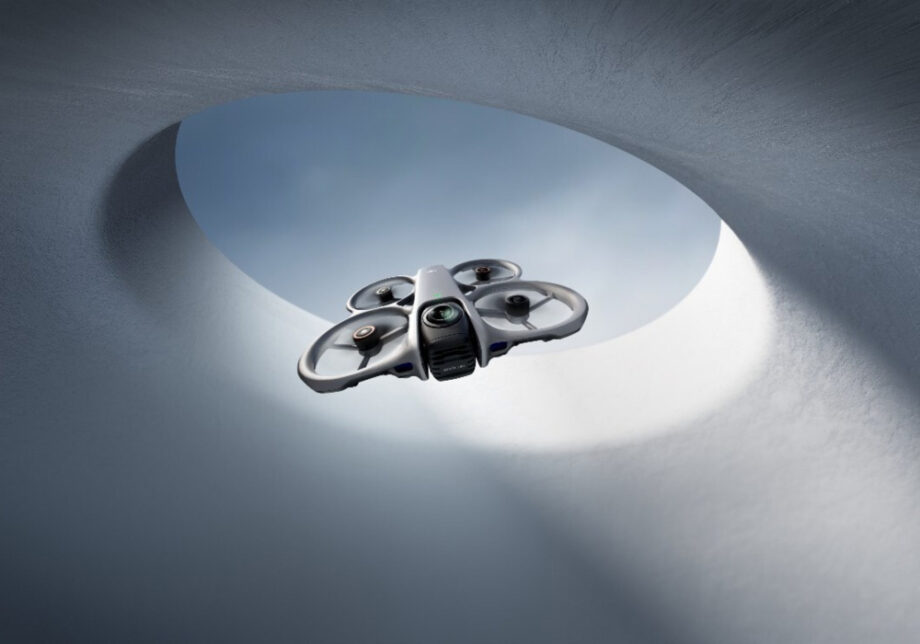
The DJI Avata 360 is a genuinely new kind of drone. It merges FPV flight with a dual-lens 360° camera system capable of shooting 8K/60fps HDR video and 120MP stills in a single pass. Backed by O4+ transmission, omnidirectional obstacle sensing, and deep post-production flexibility, it lets creators capture everything in one take and shape the narrative entirely in the edit.
Most drones force a choice: you can fly or frame. Point, position, and hope the moment cooperates. The DJI Avata 360 reframes that entirely. By pairing a full 360° dual-lens camera with FPV flight capability, it captures everything around it simultaneously, leaving the creative decisions for later. Whether you’re a solo filmmaker, a content creator tired of setting up multiple angles, or someone who simply wants more from a drone than another floating wide shot, this machine offers something meaningfully different.
Launched on March 26, 2026, the Avata 360 is DJI’s first-ever 360° drone, and while it wasn’t first to market, the Avata 360 is wonderfully versatile and surprisingly accessible. It goes up against the Antigravity A1, the only other 360° drone currently available, and offers considerably more creative flexibility.
Two lenses, one take
The DJI Avata 360 is equipped with dual 1/1.1-inch wide-angle cameras positioned on opposite sides of the module. Each has a resolution of 64 megapixels, a 200-degree field of view, and an equivalent focal length of 7.8mm at f/1.9, with 20 degrees of overlap to provide seamless stitching for both video and stills.
At launch, the gimbal on the front points the camera forward, keeping the lenses protected so there’s no downward-facing lens on takeoff. Once the drone is airborne and switched into 360 mode, the lens flips automatically. Now you have a lens at the top and one at the bottom, and that’s how it captures 360 video. Due to the Avata 360’s design, the drone itself remains invisible in the shot.
The result is footage that gives editors complete positional freedom in post. Reframe for horizontal, vertical, or any angle in between, all from a single clip.
Key imaging specs at a glance:
| Spec | Detail |
|---|---|
| 360° video resolution | 8K (7680×3840) at up to 60fps HDR |
| Single lens video | 4K/60fps |
| Photo resolution | 120MP (16K 360°) or 30MP |
| Sensor size | Dual 1/1.1-inch, 64MP per lens |
| Lens aperture | f/1.9 |
| Pixel size | 2.4 μm |
| Colour profile | D-Log M supported |
One honest caveat worth noting: the Avata 360 prioritizes FPV freedom and flexibility over pure video quality. Though the specs promise 8K, that only applies to the full 360° video. The final, flat reframed video will be 4K or less after processing, and digital zoom further reduces resolution. The video is less sharp than that of DJI’s regular Mini, Air, and Mavic drones. For creators building a workflow around post-production reframing rather than pristine straight-to-output footage, that’s a reasonable tradeoff. For those who want sharp, direct 4K output from a traditional camera angle, the standard single-lens mode delivers.
FPV or controller: your choice
One of the Avata 360’s most practical differentiators is its flexibility in how it’s flown. The Avata 360 gives buyers a choice, one of its main advantages over the Antigravity A1, which offers only goggles and motion controller-based flight. With a twin-stick controller, the Avata 360 is perfect for solo trips, requires no spotter, and the controls are identical to those of standard DJI camera drones like the Mini 5 Pro or Air 3S.
For those who still prefer it, flying with the Motion 3 controller and goggles remains an option. The Avata 360 is compatible with both the Goggles 3 and the Goggles N3. Strap in, and the FPV experience is genuinely immersive, with head tracking that lets you look around the full 360° environment by simply turning your head.
Note that full manual acro mode is not supported on the Avata 360. It offers only basic, normal, and sport modes. Hardcore FPV pilots who want full manual control will feel the limitations. Everyone else likely won’t miss it.
Transmission, flight time, and safety
The O4+ transmission system on the Avata 360 is the drone’s silent hero. With O4+, the transmission is rock-solid, delivering a dramatically better experience than competitors, particularly when compared directly to the Antigravity A1.
Key performance figures:
- Range: Up to 20km
- Live feed: 1080p/60fps
- Flight time: Up to 23 minutes
- Max speed: 18 m/s in sport mode
- Wind resistance: Level 5
- Storage: 42GB internal + microSD slot
- Transfer speed: Up to 100 MB/s via Wi-Fi 6 (1GB in approximately 10 seconds)
On the safety front, the Avata 360’s propellers are shielded to protect the drone and keep it safe indoors or around people. For additional protection, it has two omnidirectional obstacle sensors on the side, a LiDAR sensor up front, landing sensors on the bottom, and a camera that points in all directions.
Smart tracking that actually works
The Avata 360’s intelligent flight modes are where the post-production flexibility really comes into play.
- Spotlight Free: Allows the drone to circle or fly quickly away from a person, replicating the kind of sophisticated “dronie” move typically associated with professional cinema rigs, while the operator focuses on flying.
- ActiveTrack 360°: Automatically selects the optimal tracking mode. In Standard mode, the drone maintains a constant distance and altitude from the subject. In Cycling mode, it responds more quickly to turns and stays locked even in complex environments.
- FPV mode: Adds a natural roll effect to both automated and manual flight in post, giving footage that kinetic, high-speed character without requiring advanced pilot skills.
- Virtual Gimbal: Uses the full 360° view to enable infinite rotation and tilt for camera moves that would be physically impossible on a traditional drone.
Obstacle avoidance works well as long as the drone isn’t in Sports mode and can be set to stop when it detects an obstacle, or to divert around it.
The editing side of the equation
Since the 360° camera records everything around it, the pilot can focus entirely on flying and reframe shots later in DJI’s Studio app. This is a fundamental shift in aerial filmmaking workflow. Nail the flight path, then decide the story in the edit.
The Avata 360 shoots .osv files, and DJI Studio allows adding camera movement effects with controls to track and reframe, including many preset movements and full manual controls. The DJI Fly app handles basic editing, including GyroFrame for quick angle adjustments, and supports Wi-Fi 6 high-speed transfers for fast offloading to mobile devices.
One thing to keep in mind: stitching artifacts can appear if the drone changes speed or direction quickly. The farther the objects are from the drone, the less visible the stitching becomes. Avoiding sudden direction changes produces the cleanest 360° footage. It’s a workflow note rather than a dealbreaker, but worth understanding before the first shoot.
Worth the flight
The DJI Avata 360 is the kind of product that changes how you think about what’s possible on a solo shoot. A single flight can yield a dozen distinct perspectives. No assistant, no second angle, no setup reshoots. For creators who’ve spent time managing complicated multi-camera aerial setups, that’s a genuine operational shift.
It won’t replace a traditional high-end drone for situations where raw image quality is the priority. But as a versatile creative tool for filmmakers, digital storytellers, and visual creators who want maximum flexibility from a single piece of kit, it’s one of the most compelling things flying right now. DJI has made 360° aerial filmmaking accessible, intelligent, and surprisingly hard to put down.